
Authors

Retrieval is the beating heart of any RAG pipeline, but out of the box, it often falls short. You feed in a user query, search over embedded documents, and hope that your top-k neighbors contain what you need. Sometimes they do. Often, they almost do. And that gap shows up downstream as confused or hallucinated generations.
What’s missing is a second opinion, something that can look at the shortlist of retrieved chunks and say: this one is actually the most relevant. That’s exactly what reranking does.
In this walkthrough, we’ll plug a reranker into a basic RAG setup, show how it shifts the quality of the retrieved context, and make the case for why this step should be standard. You can follow along using this notebook and run everything end-to-end.
What We’ll Build
We’re going to build a RAG pipeline that starts with raw PDFs of patents and ends with high-precision answers. The Unstructured platform handles the parsing and chunking up front, turning semi-structured documents into clean text segments. From there, we embed the chunks, store them in a vector database, and wire up a simple RAG loop that pulls the top-k hits for a query.
That’s our baseline. On top of that, we’ll add a reranking step, reordering the retrieved chunks based on semantic relevance to the query. Finally, we’ll pass the reranked context into an LLM and compare the results with and without reranking.
Prerequisites
Unstructured
To parse and structure your documents, you'll need access to the Unstructured Platform. Contact us to get access—or log in if you're already a user.
AWS
To connect Unstructured to your S3 bucket, you’ll need an AWS access key ID and secret access key with permissions to read from and write to the relevant bucket. These credentials are passed to the Unstructured client when you configure your destination.
Make sure your S3 bucket exists and that you've uploaded a few sample files to it (you can find the accepted file types here 🙂). Ideally, longer-form patent filings or anything with dense, structured text. These will give you a good feel for how reranking helps cut through noise.
Pinecone
Next, set up a Pinecone account. You’ll need your API key, which you can find in the Pinecone console under API Keys. Pinecone will act as our vector store, where we embed and index the parsed chunks for fast semantic retrieval.
If you haven’t already, create an index with a cosine similarity metric and a dimension that matches your embedding model (we’ll be using 3072-dimensional embeddings in this walkthrough).
Cohere
We use Cohere to rerank the retrieved chunks before passing them to the language model. You’ll need to sign up for a Cohere account and grab an API key from the dashboard.
The reranker model we’re using is rerank-english-v3.0, which takes in a query and a list of documents and returns them sorted by relevance. You don’t need to fine-tune anything, the hosted model works out of the box.
OpenAI
Lastly, we’ll use GPT-4o from OpenAI to generate the final answers and text embeddings. If you don’t already have an OpenAI API key, you can create one from your account dashboard.
Building the Processing Pipeline
Now that we’ve connected all our services, it’s time to wire them into a full document processing pipeline using the Unstructured Platform. This pipeline handles everything from parsing raw PDFs to storing embeddings in Pinecone, so retrieval just works out of the box.
We start by creating a Source Connector pointing to an S3 bucket that contains the patent filings. You’ll need your AWS access keys and the S3 URI where the documents live. Once configured, Unstructured can pull from that bucket and stream documents into the workflow.
Next, we configure a Destination Connector that points to Pinecone. This is where all processed data — chunked and embedded — gets stored. The connector requires your Pinecone API key, index name, and (optionally) a namespace to organize documents.
With source and destination set, we define the actual pipeline. This one uses a Vision-Language Model (VLM) powered Partitioner powered by Claude 3.7 Sonnet to extract semantically rich elements from each page. We follow that with a chunker, which breaks the document into manageable pieces for retrieval, and finally an embedder, which converts each chunk into a vector using OpenAI’s text-embedding-3-large.
The workflow is submitted as a custom job to the Unstructured platform and run asynchronously. Once started, we can poll its status until completion, at which point all processed chunks are available in Pinecone, ready to be searched.

Wiring Up the RAG Pipeline
With all our patent chunks now embedded and stored in Pinecone, we're ready to move into retrieval. This is where the RAG loop begins: take a user query, pull the most relevant chunks, and pass them to an LLM to generate a response.
Our baseline pipeline is intentionally simple:
- Retriever — grabs the top-k documents from Pinecone based on embedding similarity.
- Generator — feeds those chunks into GPT-4o and returns an answer grounded in the retrieved context.
We start by connecting to the Pinecone vectorstore using the same index we wrote to earlier:
def connect_pinecone(index_name: str):
    embeddings = OpenAIEmbeddings(model="text-embedding-3-large")
    pc = Pinecone(api_key=os.environ["PINECONE_API_KEY"])
    index = pc.Index(index_name)
    return PineconeVectorStore(
        index=index,
        embedding=embeddings,
        text_key="text",
        namespace='Default'
    )
Once connected, we define a simple retrieval function:
def retrieve_docs(vectorstore, query: str, k: int = 20):
    return vectorstore.similarity_search(query, k=k)
And then a wrapper around GPT-4o to generate answers from the retrieved docs:
def generate_answer(query: str, docs: list[Document]):
    llm = ChatOpenAI(model="gpt-4o", temperature=0)
    context = "\n\n".join([doc.page_content for doc in docs])
    prompt = f"Answer the following question using the context:\n{context}\n\nQuestion: {query}\nAnswer:"
    return llm.invoke(prompt)
Together, these give us a clean, fast baseline but one that still relies entirely on vector similarity. That’s where things start to break down for more complex queries.
Adding Reranking to the Loop
Plain vector search can only take us so far. It’s fast and useful, but not always precise, especially when the query has nuance. Sometimes, the most relevant chunk isn’t in the top 10 by vector similarity alone. And when that happens, the language model doesn’t stand a chance.
That’s where reranking comes in.
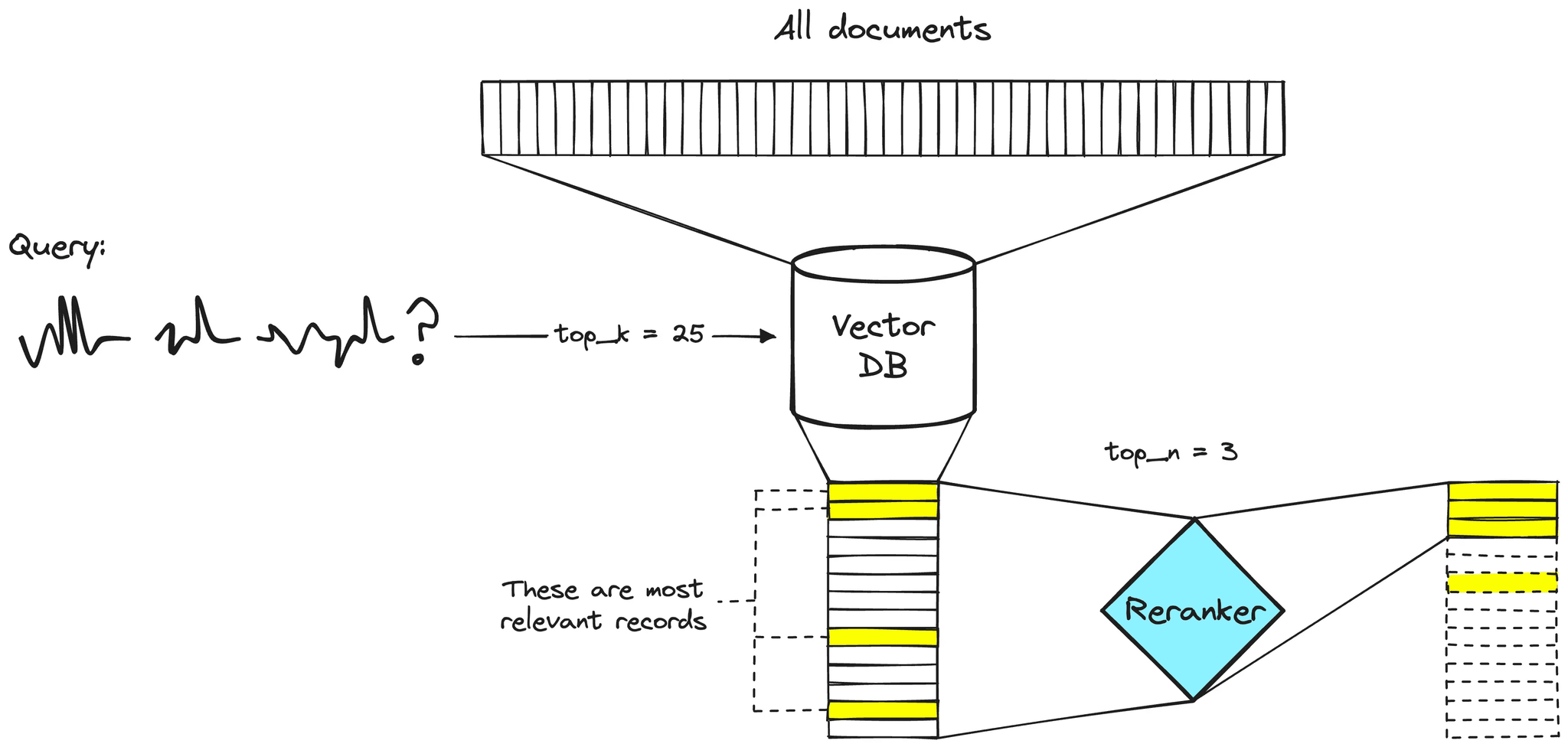
Instead of trusting the top-k results from the vector store, we over-fetch, for example, the top 30 and hand them off to a reranker. This model scores each chunk by how well it actually matches the query, and reorders them accordingly. From there, we just keep the top N (e.g. 10) and pass those into the LLM making this a two stage retrieval process.
Here’s a quick diagram of how a reranker works and the function we used:
def rerank_docs(query: str, docs: list[Document], top_n: int = 5):
    response = cohere_client.rerank(
        query=query,
        documents=[doc.page_content for doc in docs],
        top_n=top_n,
        model="rerank-english-v3.0"
    )
    return [docs[r.index] for r in response.results]
We wrapped this into a slightly modified RAG class that first retrieves, then reranks, then generates:
class EnhancedRAGSystem:
    def __init__(self, vectorstore, k=30, top_n=10):
        self.vectorstore = vectorstore
        self.k = k
        self.top_n = top_n
    def query(self, question):
        initial_docs = retrieve_docs(self.vectorstore, question, k=self.k)
        reranked_docs = rerank_docs(question, initial_docs, top_n=self.top_n)
        return generate_answer(question, reranked_docs)
This one extra step of reordering before generation makes a surprising difference. Especially when dealing with dense, technical documents like patents.
Vanilla RAG vs RAG with Reranking
Let’s put both systems to the test with a hard query:
“Which of the two patents does not reference reward-based optimization, and what training approach does it use instead?”
This is where naive RAG struggles, the key answer isn’t in the top-10 most similar chunks.
Vanilla RAG (k = 10)
Basic RAG Results:
Retrieved 10 documents
Answer: There's not enough information to determine which of the two patents does not reference reward-based optimization and what training approach it uses instead.
Total Tokens: 7234
Takeaway: The answer is vague. No decision is made. None of the top 10 chunks hit the relevant passage.
RAG with Reranking (fetch 30 → rerank → top 10)
Enhanced RAG with Reranking:
Retrieved 30 documents
Reranked to top 10 documents
Answer: The patent US 11,886,826 B1 does not reference reward-based optimization. Instead, it uses an iterative training approach based on one or more datasets, which may include user instruction data or user-labeled data.
Total Tokens: 7667
What changed? The right chunk was deep in the retrieval set, somewhere in the 20s. Vector search didn’t rank it high, but the reranker pulled it up.
🔁 What if we just send all 30 chunks to the LLM?
Basic RAG Results (k = 30):
Retrieved 30 documents
Answer: The patent that does not reference reward-based optimization is US 2024/0256582 A1. Instead, it uses a training approach that involves generating a set of search results for a search query and providing these results as part of an input prompt to guide a generative AI model...
Total Tokens: 22530
It worked, but at 3x the cost. And here’s the thing: it gave a different answer. GPT did its best with all 30 chunks, but it also hallucinated around the actual source and patent references.
🧭 Make Retrieval Count
If you’re working with retrieval and starting to feel like your top-k results are always close but not quite, a reranker’s probably worth trying.
It doesn’t change your pipeline much, you still embed, you still query, but now you cast a wider net, then tighten it just before generation.
In our case, it helped pull the right chunk up from the middle of the pack. That meant fewer tokens, and more accurate answers without needing to throw the whole context window at the LLM.
Is it worth it for every use case? Probably not. But if your queries are complex, your docs are verbose, or your system’s throwing “kind of right” answers a little too often, it's time to try it. Retrieval is half the battle. Reranking just tightens the loop.
Want help going deeper or scaling this out? Reach out to our team, we’re happy to walk you through more advanced use cases or integration options.
FAQ
What is reranking in a RAG pipeline, and why does it matter?
Reranking is a two-stage retrieval process where you first fetch a larger set of candidate documents from your vector store, then use a dedicated model to score and reorder them by semantic relevance to the query before passing the top results to the LLM. It matters because vector similarity alone does not always surface the most relevant chunks in the top positions, and the right answer can easily be buried in the middle of the retrieval set.
Why add reranking instead of just retrieving more documents and sending them all to the LLM?
Sending a larger context window to the LLM increases token costs and can introduce noise that leads to less precise or hallucinated answers. Reranking achieves better accuracy by pulling the most relevant chunks from a wider retrieval set without inflating the context passed to the model. In the example covered in this article, reranking matched or exceeded the quality of passing all 30 chunks to the LLM at roughly one-third the token cost.
When does reranking make the most difference in practice?
Reranking has the greatest impact when queries are complex or multi-part, when documents are long and dense, or when the relevant passage is semantically adjacent to many other chunks that score similarly under vector search. For simple, narrow queries over small corpora, the benefit is less pronounced, but for technical documents like patents or legal filings, it consistently improves retrieval precision.
How does Unstructured handle document parsing before chunks are indexed for retrieval?
Unstructured uses a Vision-Language Model powered partitioner to extract semantically meaningful elements from each page of a document, including text, tables, and layout-aware content. This produces cleaner, more coherent chunks compared to naive text splitting, which directly improves the quality of both vector search and reranking downstream since the model is scoring well-formed passages rather than fragmented text.
How does Unstructured fit into a RAG pipeline that uses external vector stores and rerankers?
Unstructured acts as the ETL layer at the front of the pipeline, handling document ingestion, parsing, chunking, and embedding before writing structured output to a destination like Pinecone. It connects to source storage such as S3 via a Source Connector and to the vector store via a Destination Connector, so the processed chunks arrive ready for retrieval without requiring custom preprocessing code. This means the reranking and generation stages operate on consistently structured, high-quality input regardless of the original document format.